
INSIGHTS
From “20 boxes” to an order entry: lessons from a fax OCR prototype
Reading the text on an order does not automatically make it ready for registration. Converting boxes into pieces requires product data, and a misread product code can cause an entire line item to disappear.
1. Check the product and pack size first
We tested an order management prototype with five fictional purchase orders, each rendered in four image conditions: 20 inputs in total. Seven matched every predefined check. This was not a test of real customer documents or received faxes, and it does not establish production accuracy or time savings.
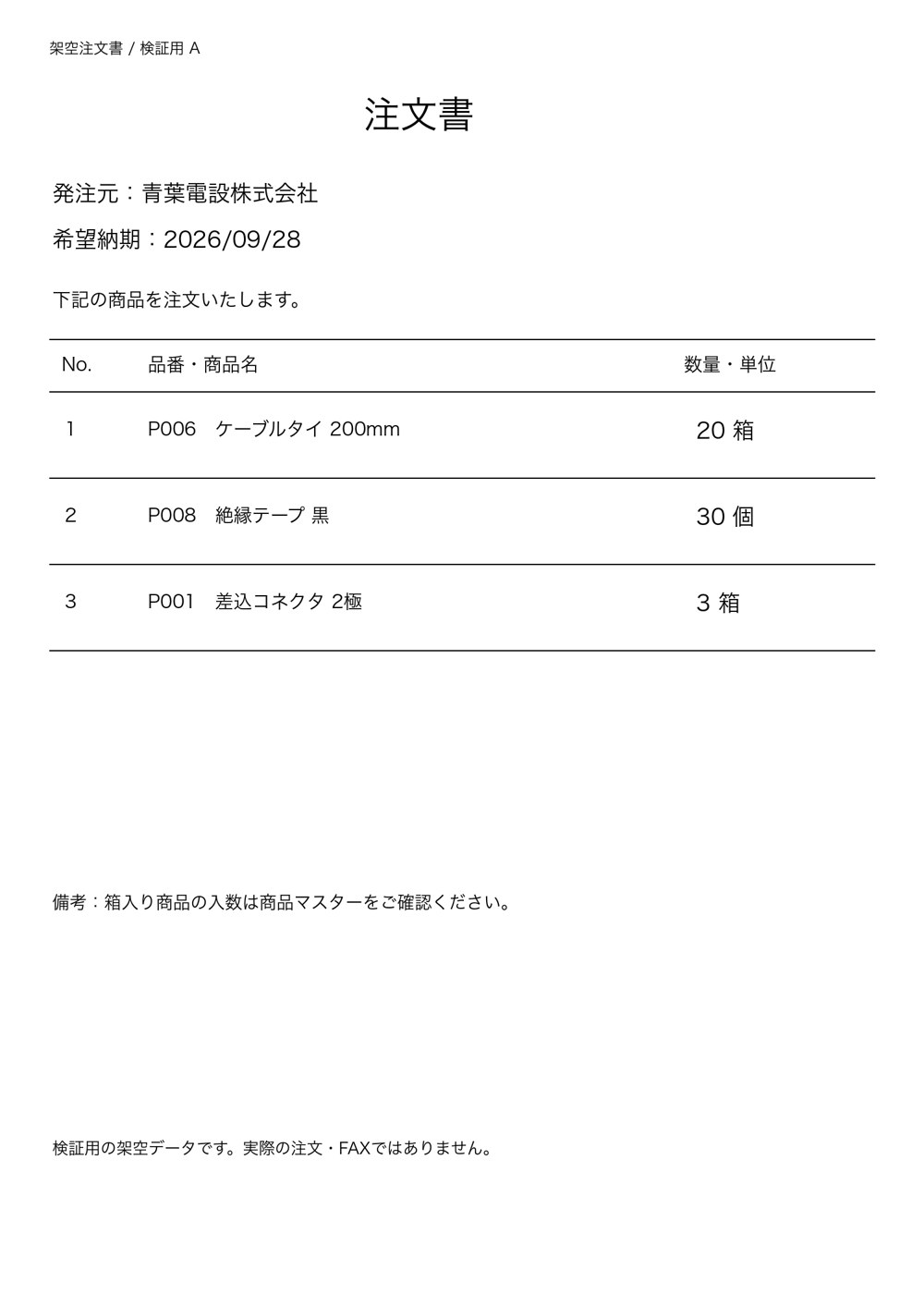
One of the sample orders contained these three lines:
| Product | Ordered quantity | Pack size | Converted quantity |
|---|---|---|---|
| P006 — Cable ties, 200 mm | 20 boxes | 10 pieces per box | 200 pieces |
| P008 — Black insulating tape | 30 pieces | 10 pieces per box | 30 pieces |
| P001 — Two-pole connector | 3 boxes | 100 pieces per box | 300 pieces |
A box does not represent the same quantity for every product. An order for 30 pieces remains 30 pieces. Text recognition and conversion using the product master are separate steps.
2. Three source lines became two candidates
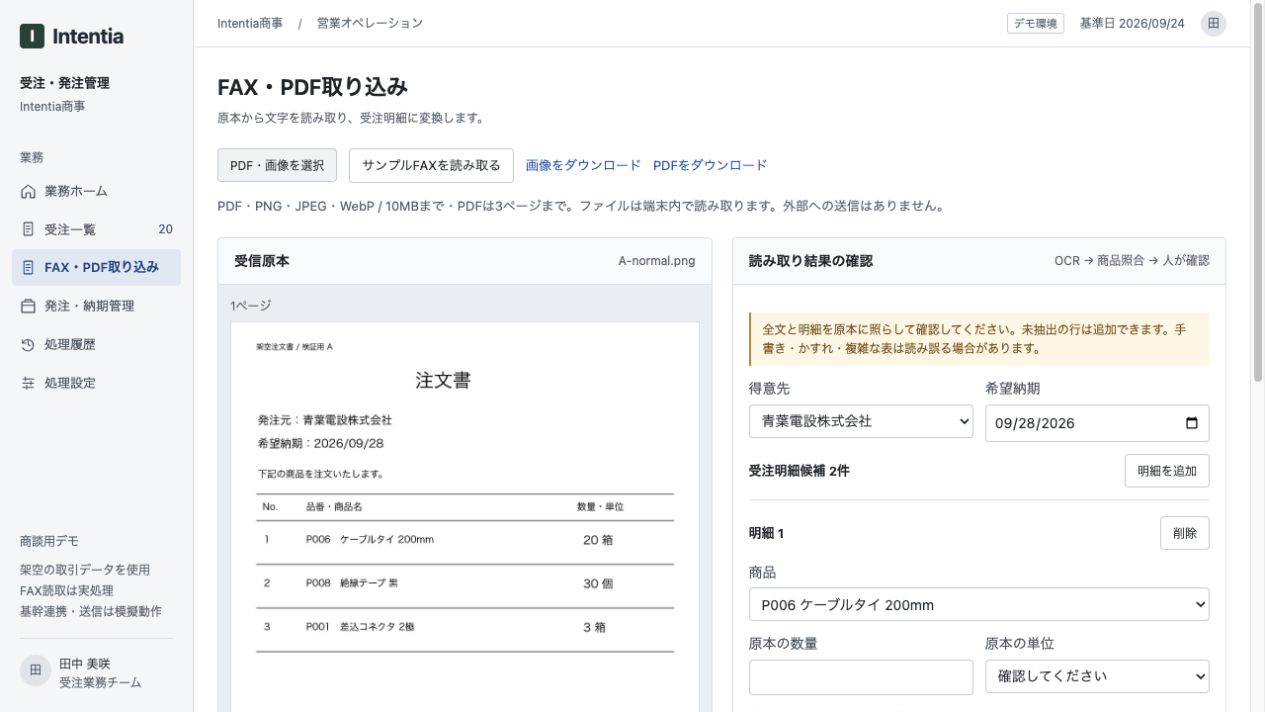
For order A at normal quality, the source contained three lines but the screen showed only two candidate items. Quantities and units could not be finalized either.
The saved OCR output read “20箱” (20 boxes) as “20 #4”, and the product code “P001” as “POO]”. The prototype uses product codes to split the recognized text into line items, so a damaged code also affects line boundaries.
Correcting visible text would not have been enough: one line was missing from the candidates entirely. Review needed to include a comparison of line counts against the original.
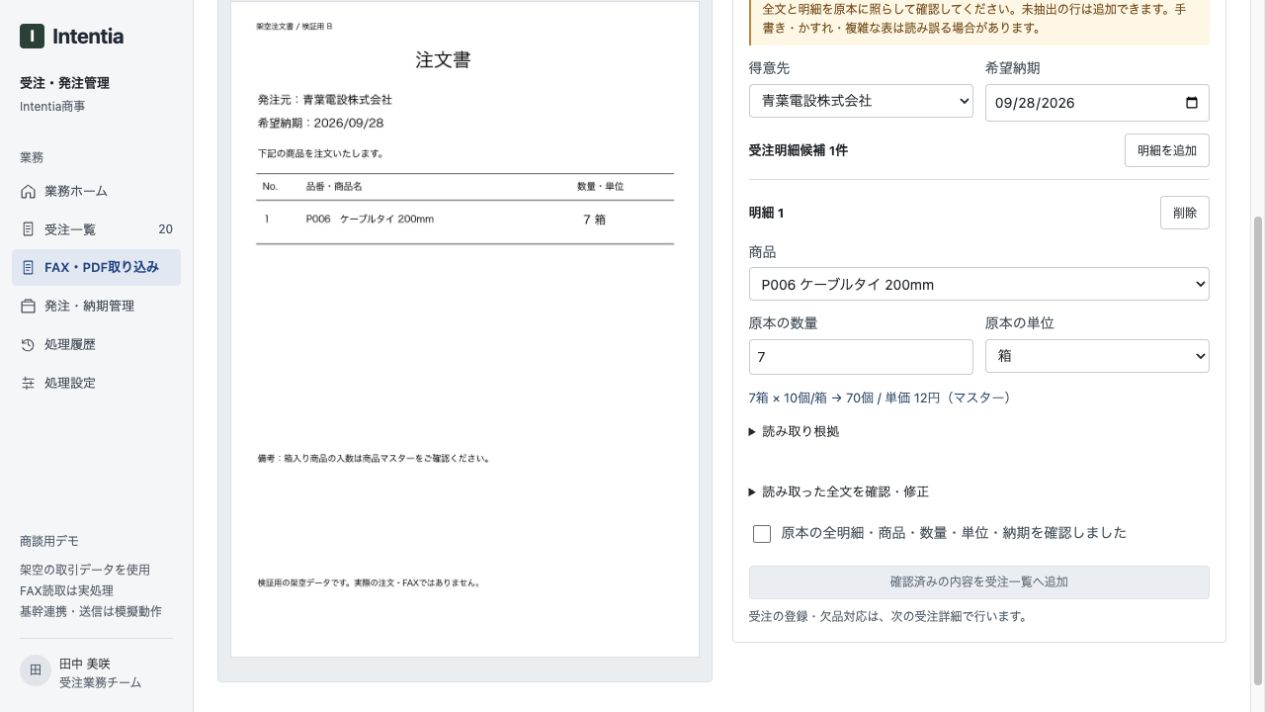
By contrast, order B had one line. The prototype extracted seven boxes of cable ties and used the master’s pack size of ten to display 70 pieces. This was a candidate result before review, not a completed automatic order registration.
3. Results across 20 inputs
The five orders shared one layout, with different products, quantities, units and line counts. Each was tested at normal quality, reduced resolution, a slight rotation and low contrast.
| Image condition | Setting | Inputs matching all checks |
|---|---|---|
| Normal | 1,500 × 2,100 pixels | 2 / 5 |
| Low resolution | Reduced to 429 × 600 pixels | 0 / 5 |
| Rotated | Normal image rotated by 3° | 3 / 5 |
| Low contrast | Contrast factor of 0.25 | 2 / 5 |
| Total | 5 orders × 4 conditions | 7 / 20 |
“Matching all checks” means the customer, requested delivery date, number and sequence of lines, product codes, quantities, units and converted quantities all matched the prepared answers. Manually corrected results were not counted. The metric does not mean every product name or every character in the document was correct.
Rotation happened to produce more matching inputs than normal quality in this sample. That does not establish that rotating documents improves results: there were only five original orders in one format. Other customer formats need separate validation.
Microsoft’s OCR documentation also discusses how image quality and rotation affect results and why evaluation on the intended documents matters. This prototype did not use Microsoft’s OCR product; the reference supports the evaluation approach, not a product comparison.
4. What to check before registering an order
- Line count: has any source line disappeared from the candidates?
- Product code: are any codes misread or products unresolved?
- Quantity and unit: have boxes and pieces been confused?
- Conversion evidence: which product and pack size were used?
Real operations also require price, stock and delivery checks. This test did not validate the entire order workflow.
In the prototype, the user reviews the original before adding candidates to the order list. A checkbox alone does not prevent recognition errors. Users also need to compare the original and result easily, and to add omitted lines.
5. Design the workflow, not just the OCR step
Automating order entry requires product matching, pack-size conversion and handling of missing lines as well as text recognition. This test demonstrated both a successful master-data conversion and a failure in which a misread product code caused a missing item. Isolating each stage helps identify where improvement is needed.
Intentia designs document reading, product-master matching and human review as one workflow. We define what can be automated and what needs human judgment, then make source comparison and corrections part of the design.
Products, documents and existing systems differ by company. We validate and refine the workflow around those conditions until it can be used in practice.
Test conditions
- Printed, fictional PNG images only. Handwriting, actual faxes, customer data and PDFs were outside the test scope.
- Tesseract.js 6.0.1 with the demo’s Japanese and English dictionaries. This was not an evaluation of generative AI document understanding.
- OCR ran from Node.js on 20 inputs, using the demo’s extraction and conversion functions. Each input used a new worker and one attempt, without corrections or retries.
- The normal-quality A and B images were additionally checked in the browser demo. All 20 inputs were not tested in the browser.
- The quantity conversion function was called for evaluation. Human approval and registration in a core system were not performed.
- These were 20 variants of five source images, not 20 independent document formats. Processing time, costs and operational savings were not compared.